| Frequently Asked Questions |
|
|
General Questions
Using the gallery
Registration & Login
Search Tips
|
AdPharm is an online pharmaceutical and healthcare advertising gallery and archive. Most ads showcased contain information (brand name, generic name, year of publication, what they are for, etc) that is stored in a database, which makes it searchable through the AdPharm site search function (log-in needed).
|
|
|
|
| Who is AdPharm intended for? |
AdPharm is intended for advertising agency creatives, account services and also to pharmaceutical companie's marketing and communications specialists looking for specific pharmaceutical advertising examples. On AdPharm, they can conduct research on advertising that has been published in the past as a reference for current or future projects. Whether it is to find ads for similar drugs or treatments, to see what the competition has advertised in the past or even to see ads that were published in the past for their own brands in different markets.
|
|
|
|
| What advertising markets are showcased AdPharm? |
Ads shown on AdPharm come from many countries such as: USA, Canada, UK, Ireland, France, Belgium and Australia. We are working diligently to increase our database by expending those markets and others as well.
|
|
|
|
| Does AdPharm showcase only Direct-to-consumer (DTC) advertising? |
AdPharm showcases mainly ads from two groups: Direct-to-consumer (DTC) and ads targeted to healthcare professionals (HCP). We also gather healthcare and pharmaceutical ads for the services industry (advertising agencies and other types of services) among others.
|
|
|
|
| Are all published pharmaceutical ads in this gallery? |
That would be the ideal situation but it is unfortunately not the case. With many new magazines appearing every year it's difficult to keep track of all publications, especially worldwide. We do gather ads from many journals (DTC and HCP) of many countries and our sample is growing continuously.
|
|
|
|
| In what year did Adpharm start gathering ads? |
Before Adpharm was... Adpharm, it was a private collection of ads gathered by a small group of creatives that were interested in building an archive that would help inform the projects they were working on for their respective agencies or clients. That private collection, which is still included in today's Adpharm was created around 2005. Interest outside of the core group grew with time and Adpharm became a site that all marketers and communicators could subscribe to as of August 2009.
Because it started officially in 2009, users can expect to have a good sample of ads from that year up until now.
|
|
|
|
| How often is the gallery updated? |
Apart from a few weeks when we close for holidays, the gallery is updated daily. We try to add new ads the day we get them, if not, within a few days. You will also notice that ads from earlier years occasionally appear in the latest ads section (log-in needed). That's because we also gather ads that were published prior to the start of AdPharm or ads that we have missed since then.
|
|
|
|
| Can I advertise prices for drugs or treatments available online? |
|
| Can I use AdPharm to self-diagnose and determine which treatment is best for me? |
No.
AdPharm is not intended to the general public and it is not managed by licensed healthcare professionals. The material shown on AdPharm is for educational and research purposes only and is intended for communications professionals. If you believe you suffer from an undisclosed illness, please consult your licensed healthcare professional.
|
|
|
|
| Why are there ads with no description or keywords? |
Due to timing, sometimes we cannot add the information at the same time as the ads come in. Since we want our users to have access to a maximum of material at all times, we post the ads immediately when we get them and add relevant information later.
The drawback to this is that the ads with no information only show up in searches when users type in a specific brand name.
|
|
|
|
| Are the TV ads really HD? |
The most recent ones are. There are still some recent commercials that can be of standard definition (SD). The reason for this is we haven't managed to capture it on a HD channel or it played in standard definition on a HD channel, which happens quite a bit.
The definition on the site says that the size is 700 X 400? This is the size it's shown within the site. If you download it or play it full-screen, the file should be 1920 X 1080.
|
|
|
|
| Where is the Prescribing information for the products featured in the ads? |
|
| How can I contact AdPharm's managers? |
|
This feature lets a logged-in user store/collect multiple files so they can consult them at any time.
Users can have multiple collections which can be accessed via the "My Collections" link located in right-hand side menu when logged-in.
|
|
|
|
| How do I save a picture to "My Collection"? |
To save an ad, simply click the Add to [Collection Name] button located directly beneath the image.
If you haven't created a collection yet, you will need to set one up first. Just click on the User menu in the top navigation bar and select My Collections to create your first folder.
Note: Cookies must be enabled in your browser for collections to save properly.

|
|
|
|
| Download My Collection as a zip file |
You can easily download your entire collection or specific selected ads as a ZIP file directly to your computer.
When viewing a gallery or your collection, click the "Select" button in the top header. You can then click on individual ads to check them off. Once you have made your selection, click the red "ZIP SELECTED" button to instantly package and download your chosen ads.
Alternatively, when viewing one of your collections, you can simply click the "ZIP FULL COLLECTION" button in the header to instantly download all files in that collection at once.
Limitation: To ensure rapid downloading and maintain smooth system performance, bulk ZIP packages are conveniently structured to hold up to 100 files per download.
Please note: Downloading ZIP files is a premium feature available exclusively to users with an active paid subscription.
|
|
|
|
|
|
Cookies are a plain text piece of data that is sent from a website and is put on to your computer.
Cookies usually allow a user to leave and return to the site without having to log-in again and other various chores. More importantly, if cookies are not allowed in your browser, you won't be able to see any of the ads on AdPharm because your browser will have "forgotten" that it is logged-in the minute you leave the log-in page. More details on the cookies used on adpharm here.
Please refer to your browser's "help" section to turn on the cookies function.
|
|
|
|
|
|
| Ads in other languages than English. |
The gallery has ads in various languages. The bigger portion is in English but you can also find French, Spanish, Romanian, Russian ads. To find ads in specific languages, type in any keyword you want (i.e. brand name, company name, year, etc) and add the language name in its English version.
For instance, your looking for a Lipitor ad from France in French language, type Lipitor France French (no quote marks) in the search field, Lipitor France Francais would yield not results.
Try a search in the gallery (log-in required)…
|
|
|
|
| Why do I get errors or empty results when I use the search function? |
That can depend on many factors: how your browser uses cookies, which browser you use, etc. Most search problems are solved simply by using the "advanced search" feature instead of the "simple search" found on the right hand side menu.
|
|
|
|
| Missing page elements in Internet Explorer 9? |

Adpharm may appear blank or might not display correctly if you are using Windows Internet Explorer 9. This is because some style elements only work with newer browsers. We recommend upgrading to IE 10 or 11 if you can or switching to Google Chrome or Firefox.
In case you cannot upgrade your browser, there's an easy fix. When Internet Explorer recognizes that a webpage is not compatible, you will see the Compatibility View button on the Address bar as seen below.

All you need to do is click the Compatibility View button in the address bar. In Compatibility View, websites will be displayed as if you were viewing them in a previous version of Internet Explorer, which ironically should correct display problems. You don’t need to click the button for a site after you’ve done it once—the next time you visit the site, Internet Explorer 9 will automatically show it in Compatibility View.
|
|
|
|
| How can I download the full-sized version of an ad? |
To be able to download the full-sized version of an ad, you need to have a subscription that allows full-size downloads and be logged-in the gallery.
To download the full-sized version of an ad, scroll down to the "File information" section under the ad on the description page and click on "Download Original File". This will download the high-resolution (print ads) or High-definition (TV) file in your download folder on your computer.
If your file does not fully download, you can try using a different browser to download the file.
|
|
|
|
| I can't view a video or flash file, what can I do? |
This may be a browser issue or a mime setting that may be missing in your browser. To overcome this issue, you can either resolve the browser issue on your end or download the file directly on your computer and play it in your favorite browser directly. To download a file, follow the instructions that can be found here.
|
|
|
|
When logged-in, users can create email alerts for specific brands, companies, therapeutic categories, etc. The Alert manager is located in the right-hand side menu.
By default, users have no alerts set-up. To create a new alert, go into the Alert Manager. Once in it, click on “Add New Alert”. Add one or multiple keywords separated by a comma. Click “Add To List” and then an “Alert Name” is added. A description can also be added.
Similarly to the site search function, the more keywords added in a single alert, the narrower the search results will be. As an example, if you add two keywords such as "Viagra" and "Cialis" in one alert, you are very likely to never receive any alerts since both brands are competing against one another. So if you want to receive alerts for both brands, then you should create to separate alerts, one for each brand.
Users receive alerts immediately when an ad matching the alert is added to the gallery. Users can create as many alerts as they want.
Alerts are sent only when new ads are added to the gallery. So if a user adds an alert, he/she will not get alerts for all the associated ads that are already in the gallery. If an older ad is sent, that would be only because the details of that ad have changed.
All alerts will come from email address admin@adpharm.net. To prevent the alerts from going in the junk mail folder, this email address should be added to the user’s address book or junk mail filter white list.
If you encounter any problem using this feature or any other, please don't hesitate to email us at support@adpharm.net
|
|
|
|
Occasionally we get backed up with many ads to include in the gallery at once. When a situation like this happens, we insert the new ads in the gallery with only minimal information so subscribers can see and download them as soon as possible even if the entry is not complete.
|
|
|
|
| Ads taken from unverified sources. |
Occasionally we include ads taken from other sources than our own in an effort to bring our users a maximum of inspirational materials in one place.
It is important to note that we cannot be absolutely sure of the provenance of these advertisements, so please use with caution.
Said ads are clearly identified so there should be no confusion for the user.
|
|
|
|
To find the number of a file or "ad" for later referral or to report some issue with it, go on the page of the specific ad and look for the PID (Picture I.D.) located in the "File Information" section below the image.

You can copy the whole URL to send or keep for later.
|
|
|
|
| Why do I need to Subscribe? |
AdPharm is now a paid-subscription service. Since pharmaceutical advertising is a niche category, displaying advertising on the site did not bring enough revenue to be able to keep AdPharm running.
|
|
|
|
| How do I subscribe or renew my subscription? |
Simply go to the subscription page and select the plan that works best for you. Our secure payment processing is handled through Stripe, allowing you to easily subscribe or renew using a Credit Card, Apple Pay, or Google Pay.
If the payment links on the subscription page do not work properly in your browser, you can also send us an email at sales@adpharm.net and we will send you a secure invoice that you can pay online.
|
|
|
|
| How do I create my user access? |
Creating an account on AdPharm is a simple two-step process:
1. Create a Free Account: To get started, you must first register for a free basic account. Simply click the "Register" link in the top menu and fill out the quick registration form. This will grant you immediate basic access to the gallery.
2. Upgrade to Premium: Once your free account is set up and you are logged in, you can upgrade to a paid subscription at any time. Just visit the Subscription page, choose the plan that works for you, and complete the secure payment. Your account will be instantly upgraded to Premium!
Returning Users: If your previous paid subscription has expired, your account simply reverted to the free tier. Just log in with your usual credentials and visit the Subscription page to re-upgrade your access.
Revised March 8, 2026
|
|
|
|
Go to "Login", submit your username and password
IMPORTANT: Cookies must be enabled otherwise your browser will not be able to keep you logged-in.
|
|
|
|
| Can I use my email address to login? |
|
| When will I get access to the gallery content once I’ve purchased a subscription? |
Access is granted instantly! Upon successful payment through our secure checkout, you will be automatically redirected back to AdPharm and your account will be immediately upgraded to Premium status.
Note: In some rare cases, strict privacy settings in your browser may prevent this automatic redirection. If your account does not immediately reflect your new Premium status, please email us at support@adpharm.net using the email associated with the payment and we will instantly verify your account.
|
|
|
|
| When can I expect an answer from Adpharm if I email them? |
Our sales (sales@adpharm.net) and support (support@adpharm.net) team can be reached via email during work days from Monday to Friday, 9AM to 5PM (EDT - Eastern Daylight Time).
So if you email us during the week-end, you can expect a reply the following Monday before 5PM EDT.
Please note that we answer users with subscription first. We reserve the right to not answer all inquiries from non-subscribers.
|
|
|
|
| Questions regarding the gallery billing and Tax |
You can view, download, and print all of your past receipts and invoices at any time. Simply go to your Profile page and click the "Manage Subscription" button to access your secure billing portal.
Sales taxes are applicable for buyers located in Canada.
Please note that Adpharm is owned by Outbreak Communications Inc.
Quebec Provincial Sales Tax Number (PST): 1215586037
Canadian Sales Tax (GST): 85466 6260 RT0001
|
|
|
|
| I can't login, what do I do? |
New users
Does your browser allow cookies? If not, please refer to the following FAQ entry: What are cookies?
If you did purchase a subscription but were not automatically redirected to complete your login, please contact us at: sales@adpharm.net using the e-mail account that was used for your payment.
Returning users
Make sure that your browser allows cookies.
Are you sure your subscription hasn't expired? Although we send renewal messages via email, sometimes those messages end up in the junk mail folder. Accounts are gracefully downgraded upon expiry, but your username and password will still work. If you believe your account should be active but isn't, please email us at sales@adpharm.net.
You can also try emptying your browser cache and deleting your cookies, which can solve some login problems.
If you still have log-in issues after trying all of the above, please sent us an email at support@adpharm.net with the issue, and your user name.
|
|
|
|
| What if I forgot, or want to change my password? |
There are two ways to update your password, depending on whether you are currently logged in or have forgotten it.
To change a known password:
If you are already logged in, simply go to your My Account page. Scroll to the bottom of your profile and click the "Change my password" button. You will be prompted to enter and confirm your new password.
To recover a forgotten password:
If you cannot log in, you will need to request a password reset using the forgot password link on the log-in page. Note: You will need access to the email inbox associated with your account.
Enter the email address associated with your subscription and click OK. Once you have entered the proper email address, you will see a message prompting you to check your emails for further instructions.
You will get an email from the system with the subject "New password request" soon after. Click on the link found in the body of the email to request your new password.
If you cannot find the email within 5 minutes after making the request, please check your junk mail folder. If it's not there, please email us at admin@adpharm.net requesting a new password. Your previous password should still work until we change it on our end.
By clicking on the link in the email, you will be brought back to adpharm.net where you will get confirmation that your password has been changed. Your new password will then be sent to you in a second email.
As for the previous step, if you cannot find the email with your new password, it may have ended up in your junk mail folder.
Please note that only the owner of the account can request a new password. If that person is no longer with the company for which the subscription has been purchased, send us an email at admin@adpharm.net mentioning the user name and the email address associated with the subscription. We will change the email associated with the account.
|
|
|
|
| What if I changed my email address? |
You can easily update your email address yourself at any time. Simply go to your My Account page, type your new email address into the Email field, and click the "Apply changes" button.
Note for Premium Subscribers: Updating your email on AdPharm does not automatically update where your payment receipts are sent. To change your billing email, please also click the "Manage on Stripe" button on your profile page to update your information in the secure billing portal.
|
|
|
|
| Why can't I see who else is on the site? |
We value our users' privacy and therefore we do not list current users online nor do we make our users list available.
|
|
|
|
| How do I cancel my subscription? |
You can easily cancel your premium subscription at any time. Simply go to your My Account page and click the "Manage on Stripe" button to access your secure billing portal. Follow the prompts to cancel your plan.
Your premium access will remain active until the very end of your current paid billing period, after which your account will automatically downgrade to the free tier.
Subscriptions are not refundable as stipulated in our Payment Terms.
Note regarding account deletion: If you wish to completely remove your account and all associated data from the gallery, you can do so yourself by scrolling to the bottom of your My Account page and clicking the button to delete your profile.
CRITICAL: Deleting your AdPharm profile does not automatically cancel your active subscription. You must click "Manage on Stripe" and cancel your billing before you delete your account!
|
|
|
|
| Will I be notified when my subscription runs out? |
|
|
| Will I get a receipt for my subscription? |
Yes. Receipts are sent via email by Stripe upon completion of payment. You can also securely access, view, and download all of your past receipts at any time by clicking the "Manage Subscription" button on your profile page.
|
|
|
|
| I've completed payment for my subscription, now what? |
|
|
| Why can't I log-in after renewing my subscription? |
If you have an active subscription that auto-renews, there should be zero disruption to your service. Your username and password remain the same.
If your subscription expired and you purchased a new plan, your account should have been instantly upgraded when you completed your payment. If you still cannot access Premium content after paying, please email us at support@adpharm.net and we will verify your status immediately.
|
|
|
|
| Why should I log-out of the ad gallery when I'm done? |
If you leave the site (close the window or quit your browser) and plan to log back in in the next few minutes, you should log out first. Depending on how soon you come back to adpharm.net, you may be locked out for a few minutes. This is because the system thinks that there's already someone logged in with your credentials. This lock-out period should last no more than a 15 to 20 minutes from the moment you left the site while logged in.
If you cannot log back in after 30 minutes, please email us at support@adpharm.net and we will sort it out.
|
|
|
|
| Can I use the site with multiple computers? |
Yes.
Users with paid subscriptions can log in from the office and then at home or any other place. Just make sure to log out before changing to another computer or device. If you forget to log out and get a warning message saying that someone is already logged-in with your user name when trying to log back on, just wait a few minutes and you will be able to log back in.
If you cannot log back in after 30 minutes, please email us at support@adpharm.net and we will sort it out.
|
|
|
|
| I've been banned, what do I do? |
There are a few reasons why your user name may have been banned or your access revoked. The most common reason for this is if you mistakingly typed in the wrong user name or password too many times. If that is the case, try again in a few minutes. This type of "ban" expires after roughly 5 minutes.
Other reasons for bans are that it was recorded that either you or someone within your network tried hacking in the system; or more than one computer has tried logging in using a single user name at one time which is strictly forbidden and can result in a permanent ban unless you have a corporate or shared subscription. If payment to the site is cancelled or witheld, this can also result in a ban or revoked access.
If you have been banned and you believe you did nothing that went against our policies, please e-mail us at support@adpharm.net.
|
|
|
|
| What is a Single-User subscription? |
The Single-user subscription is a purchased access that can only be used by one person. Sharing of the user access details is prohibited as per our user agreement.
|
|
|
|
| What is a Shared-User subscription? |
The Shared-user subscription is a purchased access that can be used by anyone in a given company or organization. It comprises one main user to which the user name and email address will be attached to, plus a number of additional "seats" that can access the gallery at the same time. The number of simultaneous log-ins is determined by the number of seats purchased by the main user. Sharing of the user access details outside of the user's company or organization is prohibited as per our user agreement.
|
|
|
|
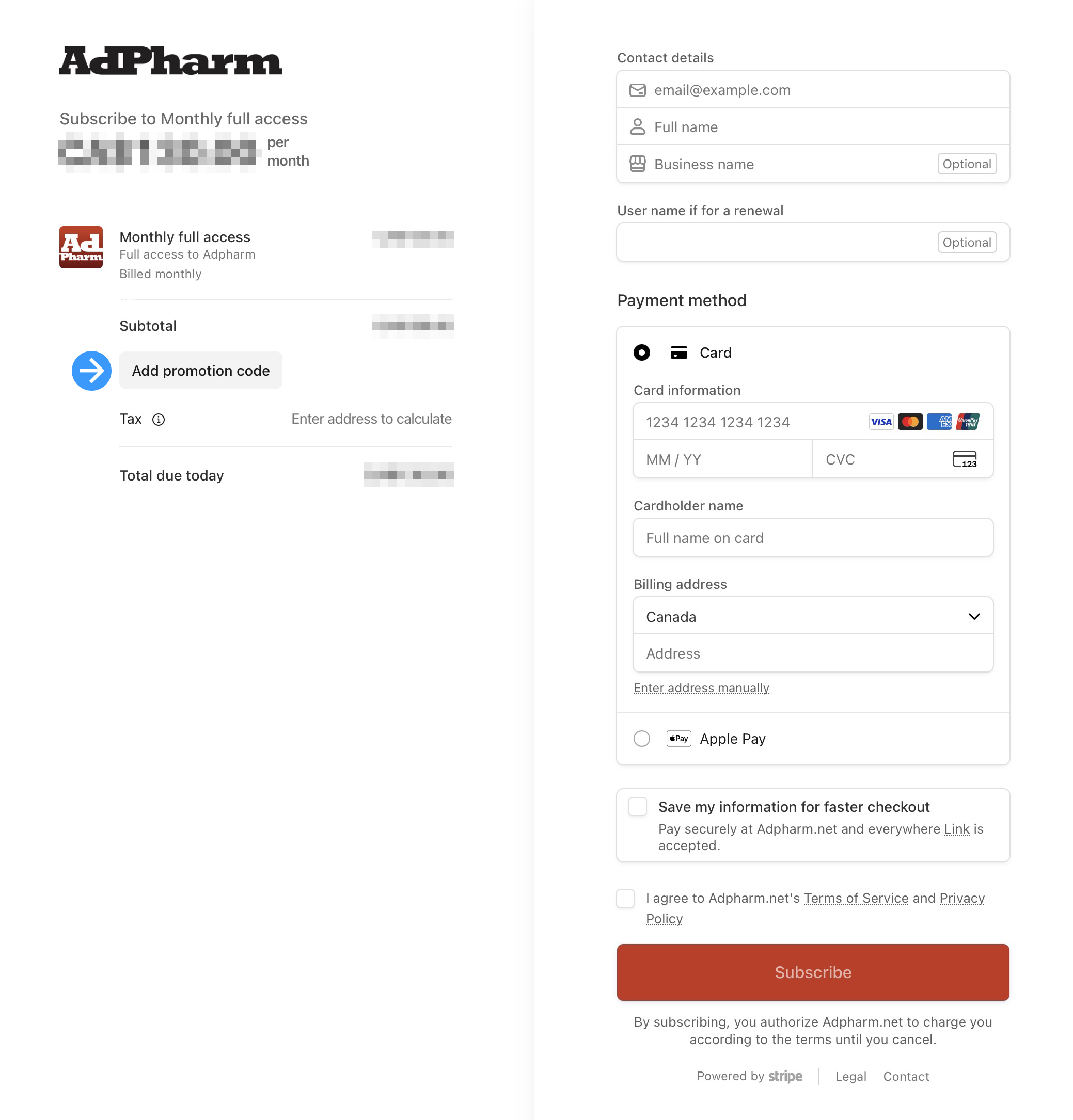
| How do I apply a coupon or promotional code during the payment process? |
Users with coupons or promotional codes can enter them directly during the secure Stripe checkout process. Look for the "Add promotional code" field on the left side of the payment form before you complete your purchase.
|
|
|
|
| How can I search the ad database? |
Simply go to the search input field present on all of the site pages on the right-hand side menu (when logged-in) and type in one or more keyword(s) (i.e. "cholesterol USA'). The more keywords you put in, the narrower the search results will be (i.e. "cholesterol USA DTC") would give you the same search results as above but narrowed down to only direct-to-consumer ads.
For avanced search features, use the advanced search page (log-in required).
|
|
|
|
|
|
| Are there categories in the ad gallery? |
|
| Do you have a page listing all brands and linking to them? |
We do and it can be seen here. As we are adding content to our archive pretty much daily, this page is in constant evolution. Please note that not all of the brands available on this site are listed on the brand page at this moment. If a brand you are looking for is not listed, it doesn't necessarily mean we don't have any ads for it in the gallery. Please try searching for it on the search page.
|
|
|
|
| Can I search by publication or airing dates? |
In order to find specific publication or airing dates, you can do this in both the quick search form or the advanced search page by entering the month and year you are looking for. You can narrow your search by adding any the following:
- Brand name
- Country name
- Company name
- DTC (Direct to consumer)
- HCP (Healthcare Professional)
- Etc.
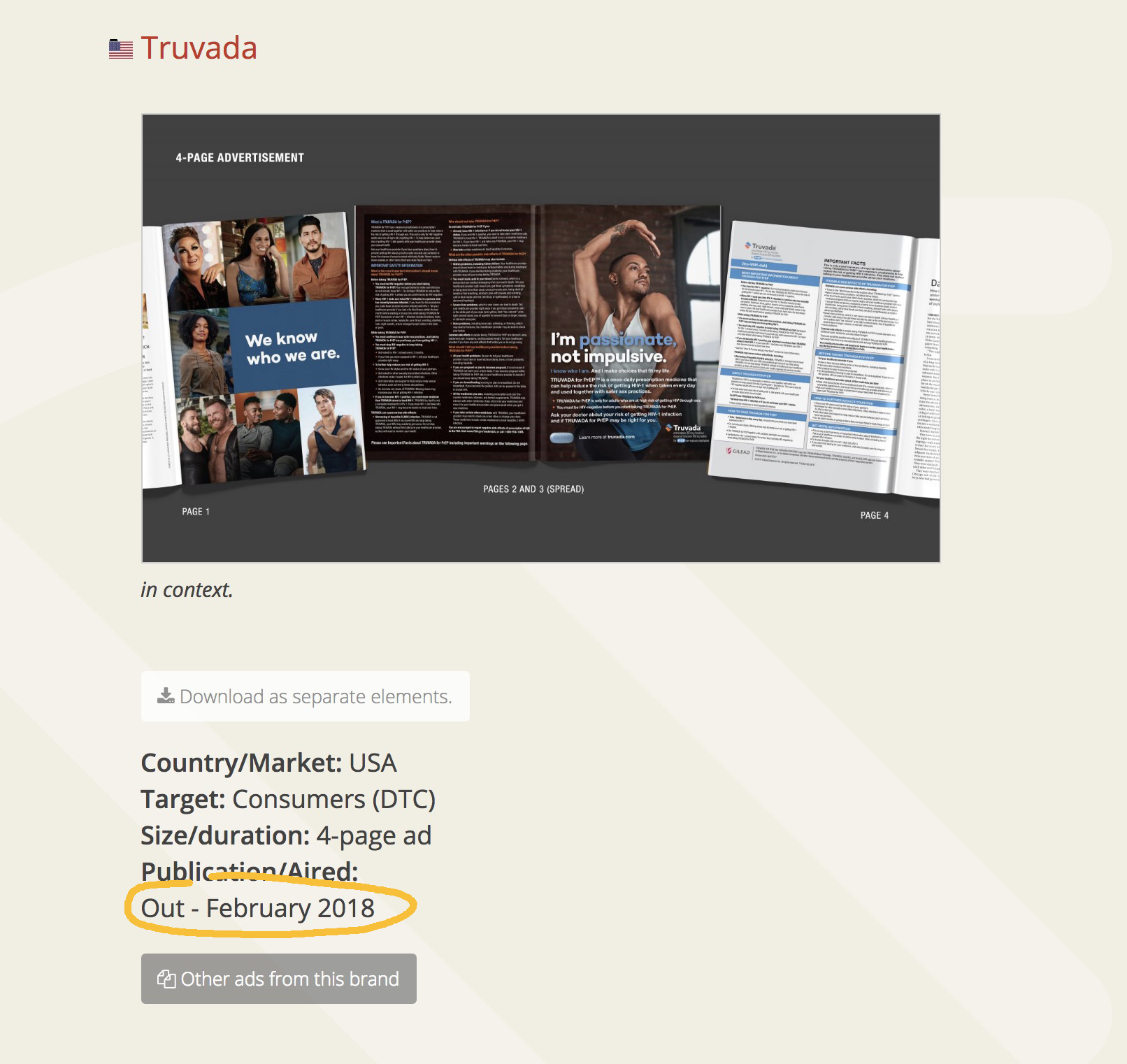
As an example, your search field could look like this: Truvada January 2017 DTC
There is always a possibility that a search similar to this could bring some false positives in the search results. You can confirm the publication date by looking for the "Publication/Aired" section that is present on each entry as shown on the image below.
|
|
|
|
| Is there are list or search function just for ad taglines? |

This is a new feature that was added in February 2015 and it is still being worked on. The taglines page can be accessed via the "Sections" tab in the sites main navigation or you can access it directly here.
Not all advertisements have a tagline and sometimes it can be unclear what constitutes a tagline. Usually it's group of words that is close or attached visually to the brand logo. Occasionally an ad may have more than one tagline. We only add the tagline for the main brand in such a situation.

A specific taglines search can be done via the search form at the top of the taglines page.
tagline, taglines, slogans, brand promise
|
|
|
|
| Why do I get errors or the wrong ad when I click on a thumbnail after a search? |
AdPharm’s search engine can only process one search at a time. For instance, if you use multiple browser tabs at one time to do multiple searches, AdPharm will only remember the results of the last search you did. So if you go back to another tab from a previous search, those results will be obsolete and may show you the wrong ad when clicking to get the high-resolution version of the image.
To remedy this, simply do one search at a time. Once you have seen or downloaded what you need, then you can do a new search. If you still get errors while searching, please empty your browser cache, quit your browser and restart it. That should solve the problem.
|
|
|
|
| Can I use full sentences in my searches? |
Our search engine is designed for using simple queries. So sentences such as "commercials about bladder control with wedding theme" would not yield many results, if any at all. A better combination would be words like: "bladder control wedding", which as a sentence makes little sense but to our search engine would mean: "find ads about bladder control that also has something to do with a wedding. On our advanced search page (log-in required), there are some features to clarify your search such as:
"and" and "or" – with "and", if you enter more than one keyword in your search, the results will be narrower than if you select "or" because the search will give you results that have necessarily the two keywords attached to it.
Title - Conduct a search only using the title of the ad
Caption - Conduct a search using the caption. Having this selected or not may have a great impact on the quality of your search depending on how wide you want it to be. In the caption are included most of the messaging (copy) for the ad, including headline and tagline, there's also the publication and date (if available), indication, generic name, maker, etc.
Keywords - In the keywords section are included most tags that we believe are most important to the user. Most of the words, image details, indication, year of publication, format, therapeutic area, etc. that pertain each specific ad are added manually here. Our "caterogies" list is based on those keywords and we are improving them constantly.
Age - Helps the user searching for new or older ads (in terms of the date it was added to the gallery).
You can check any of those selections. The more you select, the narrower, or wider your search will become, depending on which of the "or" or "And" selector you chose. Try various combination of keywords with our search features to see what works best.
|
|
|
|
| What kind of keywords can I use for a search on AdPharm? |
Well, you can use any English word you want. Having said that, as a communications specialist, you may want to search for specific mediums (e.g. print ad, TV commercial, direct-mail, etc.). You may also be interested in seeing only certain formats of print ads (e.g. single-page vs. double-page spread). You may also want to search specific areas of healthcare ads (e.g. cardiovascular, oncology, breast cancer, gastro-intestinal, et or ads for generic vs. branded drugs, ads using illustrations vs. photography, ads using spokespersons or testimonials. The list goes on.
Try it on the search page (log-in required).
|
|
|
|